How to Humanize AI Text in 2026: Complete Guide
Humanize AI text in minutes with 12 practical techniques and before and after examples. Learn how to make AI writing sound natural with Prosify.
AI can write a first draft in seconds. Making that draft sound like something a real person would actually say is a different problem.
The best way to humanize AI text is to rewrite predictable phrases, vary sentence structure, simplify overly formal language, add specific details, remove unnecessary explanations, and introduce a recognizable point of view. You can do this manually, improve the original prompt, or use an AI humanizer to handle the first rewrite before reviewing the text yourself.
The important part is that humanizing AI text is not simply about replacing a few words with synonyms.
Good humanization changes the rhythm, structure, tone, and specificity of the writing while keeping the original meaning intact.
This guide explains how to do that step by step.
What Does It Mean to Humanize AI Text?
To humanize AI text means rewriting AI-generated or AI-assisted content so that it reads more naturally.
Raw AI writing is often grammatically correct. That is rarely the problem.
The problem is that it can sound too polished, too predictable, too neutral, or strangely similar to thousands of other AI-generated paragraphs.
Consider this sentence:
Artificial intelligence has revolutionized the way businesses operate, offering numerous benefits that can significantly enhance productivity and efficiency.
There is nothing grammatically wrong with it.
But it does not say much either.
A more natural version might be:
AI has changed how a lot of teams work, especially when it comes to repetitive tasks. Used well, it can save hours of manual work each week.
The meaning remains similar, but the second version is more direct. It uses simpler language, makes a more concrete point, and avoids the exaggerated tone of phrases such as “revolutionized the way businesses operate.”
That is the basic idea behind AI humanization.
A good rewrite should improve several things at once:
- Naturalness
- Readability
- Sentence rhythm
- Word choice
- Tone
- Specificity
- Personality
- Clarity
It should do this without changing important facts or introducing ideas that were never present in the original text.
Why Does AI-Generated Text Often Sound Robotic?
Modern language models can produce remarkably fluent writing.
But fluent writing and human writing are not always the same thing.
AI models generate text by predicting likely continuations based on patterns learned from large amounts of existing language. This makes them very good at producing grammatically plausible text, but it can also encourage safe and predictable writing patterns.
The result often has a few recognizable characteristics.
1. AI tends to use predictable phrases
AI-generated articles frequently contain phrases such as:
- It is important to note that
- In today’s rapidly evolving world
- In conclusion
- Furthermore
- Moreover
- This highlights the importance of
- It is worth noting that
- A wide range of
- Plays a crucial role
- Has emerged as
- Delve into
- Harness the power of
- Navigate the complexities of
- Ever-evolving landscape
None of these phrases are automatically bad.
Humans use them too.
The problem appears when several of them are packed into the same article. The writing starts feeling templated because every paragraph is connected in almost exactly the same way.
Compare:
Furthermore, AI tools can significantly enhance productivity. Moreover, they can help organizations streamline repetitive processes. It is important to note that successful implementation requires careful planning.
With:
AI tools can save time, especially on repetitive work. But simply adding AI to an existing process does not guarantee better results. Teams still need to decide where automation helps and where human judgment matters.
The second paragraph has more variation and a clearer point.
2. Sentence lengths become too uniform
Human writing has rhythm.
We write long sentences when an idea needs explanation. Then we use a short one.
Sometimes very short.
AI-generated writing often settles into a predictable pattern where sentences have similar lengths and structures.
For example:
Remote work provides employees with increased flexibility. It allows workers to structure their schedules more effectively. It can also reduce the amount of time spent commuting. Many organizations have therefore adopted remote work policies.
Every sentence follows almost the same rhythm.
A more natural version:
Remote work gives people more control over their day. For someone who used to spend two hours commuting, that difference can be enormous. It does not work equally well for every team, but the flexibility explains why so many companies kept some form of remote work after offices reopened.
The second paragraph mixes sentence length, adds context, and sounds less mechanical.
3. AI often overexplains simple points
A human writer might say:
Good onboarding helps new employees become productive faster.
An AI draft might turn the same idea into:
Effective employee onboarding is an essential component of organizational success because it enables new employees to integrate into their roles more effectively while gaining a comprehensive understanding of company processes, expectations, and culture.
Longer does not mean better.
One of the easiest ways to humanize AI writing is simply to delete things the reader already understands.
4. AI defaults to safe, generic statements
AI is very good at producing statements that are technically reasonable but not particularly interesting.
For example:
There are several factors businesses should consider when implementing artificial intelligence.
That could appear in almost any article about AI.
A human writer is more likely to make a specific argument:
The biggest mistake companies make with AI is automating a broken process instead of fixing the process first.
The second sentence gives the reader something to react to.
Specificity creates personality.
5. AI has no personal experience to draw from
An AI system can describe what using a product is usually like. It cannot genuinely tell the reader what happened when it personally used that product last Tuesday.
That distinction matters.
Human writing often contains:
- Observations
- Experiences
- Opinions
- Unexpected details
- Anecdotes
- Preferences
- Context
- Uncertainty
Those elements create a voice that is difficult to reproduce through generic text generation alone.
You do not need to turn every article into a personal essay. Even one specific observation can make a paragraph feel dramatically more grounded.
What Makes AI Text Sound Human?
There is no single formula for human writing.
That is partly the point.
People write differently.
A technical founder writing a product announcement does not sound like a college student writing an essay. A journalist does not sound like a copywriter. A lawyer does not write like someone texting a friend.
Humanized writing therefore should not mean making everything casual.
It means making the writing appropriate for the person, audience, and situation.
Strong human writing usually has some combination of:
- Sentence variation
- Specific details
- Clear opinions
- Natural transitions
- Appropriate vocabulary
- Occasional contractions
- Direct statements
- Context
- Examples
- A consistent voice
It also knows when to stop.
AI-generated writing often tries to make every paragraph feel complete. Human writers are more comfortable letting one sentence make the point.
How Do AI Detectors Identify AI-Generated Text?
AI detectors attempt to estimate whether a piece of text resembles machine-generated writing.
Different detectors use different methods, so there is no universal checklist that every system follows.
Some detection approaches analyze statistical characteristics of language. Others use classifiers trained on samples of human and AI-generated writing. Researchers have also explored signals related to predictability, vocabulary, syntax, token probabilities, and other linguistic patterns.
This means a detector is not generally discovering a hidden label inside your document that says “written by ChatGPT.”
It is making a prediction.
That distinction is important.
AI detectors can produce false positives and false negatives. A 2025 NAACL study examining machine-generated text detectors found that performance could fall considerably when detectors encountered different domains, models, or prompting strategies from those they were evaluated on.
Earlier Stanford research also found a significant problem for non-native English writers. In one study, more than half of the TOEFL essays written by non-native English speakers were incorrectly classified as AI-generated by the detectors evaluated.
Turnitin itself acknowledges that false positives are possible and treats some low-percentage results differently because results in that range are less reliable.
If you want a deeper explanation of perplexity, burstiness, scores, and why different detectors can disagree, read our guide to how AI detectors work.
An AI score should be treated as a signal, not absolute proof of authorship.
More importantly, writing should not be edited solely to satisfy a detector.
A better goal is to make the final text clearer, more specific, more natural, and genuinely representative of what you want to say.
How to Humanize AI Text: 12 Practical Methods
You can humanize most AI-generated drafts manually.
The following techniques address the patterns that make AI writing feel generic or mechanical.
1. Remove Generic AI Introductions
AI-generated articles often start from very far away from the actual topic.
Imagine an article about email marketing beginning with:
In today’s rapidly evolving digital landscape, businesses are constantly searching for innovative ways to communicate with their audiences and achieve meaningful engagement.
The reader searched for information about email marketing. They do not need a history of the digital landscape first.
Try:
Most marketing emails are ignored. The challenge is not sending more of them. It is giving someone a reason to open the next one.
The second opening reaches the subject immediately.
When editing AI content, look closely at the first paragraph. If you could delete it without losing anything important, you probably should.
2. Replace Vague Claims With Specific Ones
AI writing frequently hides behind vague words:
- Numerous
- Significant
- Various
- Several
- Substantial
- Effective
- Innovative
- Powerful
- Seamless
- Robust
Ask yourself what the word actually means in the sentence.
Instead of:
The software offers numerous features that significantly improve productivity.
Write:
The software automates scheduling, follow-ups, and weekly reports, removing three tasks the team previously handled manually.
The second version gives the reader something concrete.
Specific writing almost always sounds more credible.
3. Vary Sentence Length
Look at a paragraph from your AI draft.
If every sentence occupies roughly the same amount of space, change the rhythm.
Combine related thoughts.
Then shorten another sentence.
For example:
Before:
AI writing tools can help marketers create content more quickly. They can also assist with brainstorming new ideas. These tools are increasingly used across marketing teams. However, human review remains an important part of the process.
After:
AI writing tools make drafting and brainstorming much faster, which is why they have become common across marketing teams. But speed creates another problem: someone still needs to decide whether the draft is actually worth publishing.
The second version communicates roughly the same information but sounds less like a sequence of generated statements.
4. Use Simpler Words
AI frequently chooses a complicated word when an ordinary one would work better.
You might see:
- Utilize instead of use
- Facilitate instead of help
- Commence instead of start
- Demonstrates instead of shows
- Individuals instead of people
- Implement instead of do or introduce
- Subsequently instead of later
- Numerous instead of many
- Leverage instead of use
Formal language is appropriate in some contexts.
But unnecessarily formal language creates distance.
Compare:
Organizations can utilize artificial intelligence to facilitate improved communication between team members.
With:
Teams can use AI to communicate more efficiently.
Same idea. Half the effort to read.
5. Remove Unnecessary Transitions
Transitions help readers understand how ideas connect.
AI often uses too many.
A paragraph does not need to begin with “Furthermore” merely because another paragraph came before it.
Watch for:
- Additionally
- Furthermore
- Moreover
- Consequently
- Therefore
- In addition
- On the other hand
- It is worth noting
Sometimes the best transition is no transition at all.
Instead of:
Furthermore, AI can help automate customer support.
Write:
AI can also automate parts of customer support.
Or simply:
Customer support is another obvious use case.
The connection is still clear.
6. Add a Point of View
One of the strongest differences between generic content and memorable content is opinion.
AI naturally tends toward balanced language.
It often says:
Both approaches offer advantages and disadvantages depending on the organization’s specific requirements.
A human might say:
For a five-person startup, building this system from scratch rarely makes sense.
Now there is an argument.
A point of view does not mean being provocative for attention. It means making a judgment based on what you know.
Ask:
- What do I actually think?
- What would I recommend?
- What is commonly misunderstood?
- What advice would I give someone doing this tomorrow?
- Which option would I choose?
Those answers make writing sound like it came from someone rather than something.
7. Add Concrete Examples
Abstract writing feels generic because it could apply to anything.
Examples make it real.
Instead of:
AI can automate repetitive administrative tasks.
Write:
A sales team might use AI to summarize call notes, update CRM fields, and draft a follow-up email after each meeting.
Instead of:
Small changes can improve email performance.
Write:
Replacing “Quick question” with a subject line that identifies the customer’s actual problem gives the recipient more context before they open the email.
Concrete examples also make content more useful, which matters more than simply making it sound human.
8. Write the Way Your Audience Actually Speaks
Humanizing does not mean adding slang randomly.
It means matching the language your audience expects.
A developer might say:
The API returns the response synchronously, so this gets painful once requests start taking 20 or 30 seconds.
That is more natural for a technical audience than:
The application programming interface may present scalability challenges resulting from prolonged synchronous request-response cycles.
Both could be technically correct.
One sounds like a person explaining the problem to another developer.
Know who you are writing for before deciding what “natural” means.
9. Use Contractions When They Fit
Formal AI writing often avoids contractions.
That can make conversational content sound stiff.
Compare:
You do not need to rewrite every sentence. It is often more effective to focus on the sections that sound unnatural.
With:
You don’t need to rewrite every sentence. It’s usually better to focus on the sections that actually sound unnatural.
Neither is inherently superior.
For blog posts, marketing content, emails, social posts, and conversational writing, contractions often sound more natural.
For formal academic or legal writing, they may be less appropriate.
Humanization should always respect context.
10. Cut Repetition
AI models are prone to repeating the same point in slightly different language.
You might encounter a structure like:
Good communication improves collaboration across teams. When teams communicate effectively, they are better able to collaborate. This improved collaboration can ultimately result in better business outcomes.
That entire paragraph can become:
Clear communication helps teams work together and make decisions faster.
When editing AI content, ask:
Did I already say this?
If yes, delete it.
Repetition is one of the fastest ways to make a generated article feel longer than it deserves to be.
11. Break Predictable Paragraph Patterns
AI articles frequently follow the same structure:
- Make statement
- Explain statement
- Give generic benefit
- Summarize statement
Then repeat.
Human writing is less symmetrical.
One paragraph may be one sentence.
Another might need five.
A section might begin with an example instead of a definition.
You might ask a question.
You might challenge an assumption.
Structural variety matters just as much as sentence variety.
12. Add Information AI Could Not Have Invented Generically
This is one of the strongest improvements you can make.
Add something specific to you, your company, your work, or your subject.
That could be:
- An observation from a project
- A customer question
- A mistake you made
- A real workflow
- An unusual edge case
- A lesson from experience
- Your preferred approach
- A decision and the reasoning behind it
For example:
We originally sent every synchronization job through the same queue. That worked until one large account delayed jobs for everyone else, so we separated the workloads.
That sentence sounds human because it contains a particular event and consequence.
A generic AI system would not know it unless you supplied the information.
This is also why humanization is ultimately more than rewriting vocabulary. The best content contains information worth reading.
Want to automate the first pass? Try Prosify’s AI Humanizer. Paste your draft, choose how much rewriting you want, and get a more natural version in seconds. It’s free to try, and no credit card is required.
AI Text Before and After Humanization
Here is a larger example.
Before
Artificial intelligence is rapidly transforming the way businesses operate in today’s digital landscape. Organizations across a wide range of industries are increasingly leveraging AI-powered tools to streamline their workflows, enhance productivity, and improve overall efficiency.
One of the most significant advantages of artificial intelligence is its ability to automate repetitive and time-consuming tasks. By automating these processes, employees can focus their attention on more strategic and value-driven activities. Furthermore, AI can help organizations analyze large amounts of data, identify meaningful patterns, and make more informed decisions.
It is also important to note that successful AI adoption requires careful planning and implementation. Businesses need to evaluate their specific needs, select the right tools, and ensure that employees understand how to use them effectively. Additionally, organizations should consider factors such as data privacy, security, and accuracy when implementing AI-powered solutions.
As artificial intelligence continues to evolve, its role in the workplace will likely become even more significant. Businesses that embrace these technologies and use them effectively may be better positioned to improve productivity, adapt to changing market conditions, and maintain a competitive advantage.
This passage is grammatically fine.
It also contains several common problems:
- Generic opening
- Broad claims
- Repetitive corporate vocabulary
- Predictable transitions
- No concrete examples
- No clear perspective
After
AI is changing how businesses operate, and fast. Companies across nearly every industry are turning to AI-powered tools to cut down on manual work, get more done, and run their operations more efficiently.
The clearest benefit AI offers is handling repetitive, time-consuming tasks that would otherwise eat up employees’ hours. When those tasks are off their plates, workers can put their energy into higher-level thinking and work that actually moves the needle. AI can also help companies make sense of large datasets, spotting patterns that would be easy to miss and pointing toward better decisions.
That said, rolling out AI successfully isn’t just a matter of picking software and flipping a switch. Companies need to take stock of what they actually need, choose tools that fit those needs, and make sure their people know how to use them well. Data privacy, security, and accuracy all deserve serious attention before any AI solution goes live.
AI isn’t slowing down, and its presence in the workplace will only grow. Companies that get comfortable with these tools and put them to good use stand a better chance of staying productive, keeping up with shifting market demands, and holding their own against the competition.
The meaning did not change.
The second version is more direct, varies sentence length, uses simpler vocabulary, and replaces stock transitions with natural phrasing.
You can make those changes manually, but you do not necessarily have to rewrite every sentence yourself. Prosify is designed to do this first pass automatically by changing repetitive phrasing, sentence rhythm, and overly formal language while preserving the underlying meaning.
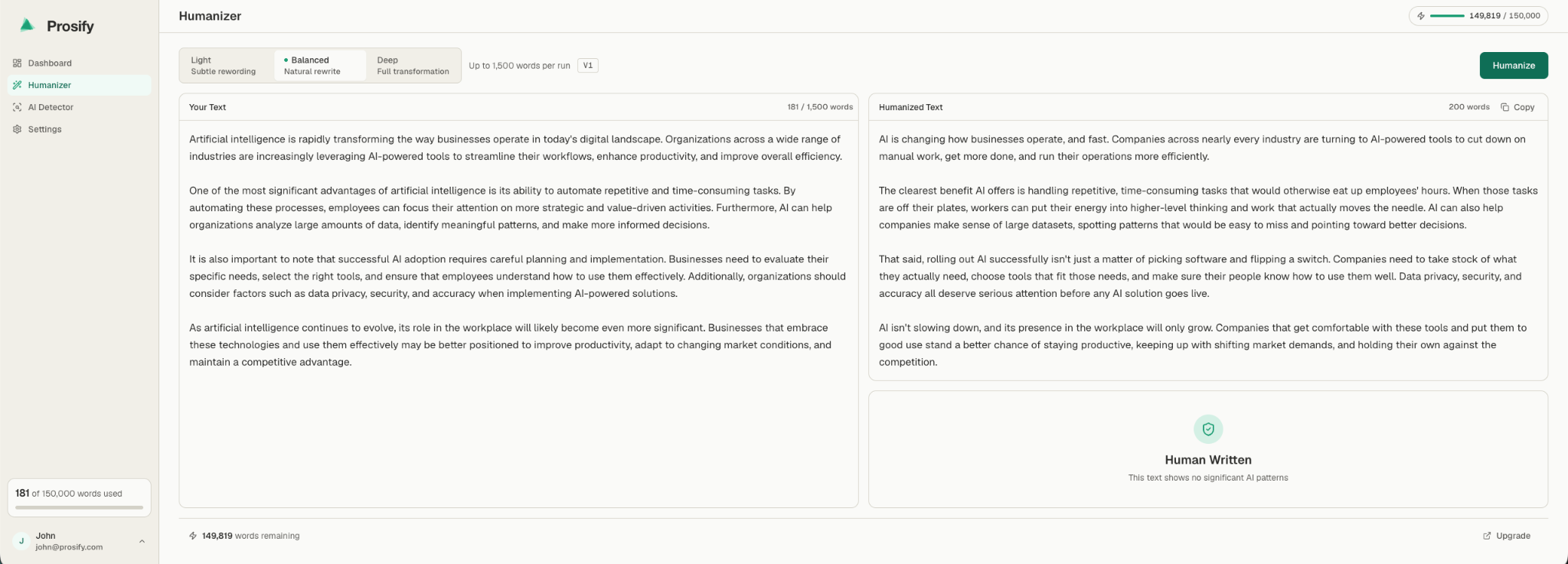
The same AI-generated passage rewritten with Prosify’s Balanced mode.
You can then review the result and add the details, opinions, or examples that are uniquely yours.
Balanced vs. Deep: How Much Should You Rewrite?
Prosify gives you three humanization modes depending on how closely you want to stay to the original text.
The example above used Balanced mode, which keeps the structure and meaning relatively close to the source while making the language more natural.
Deep mode goes further.
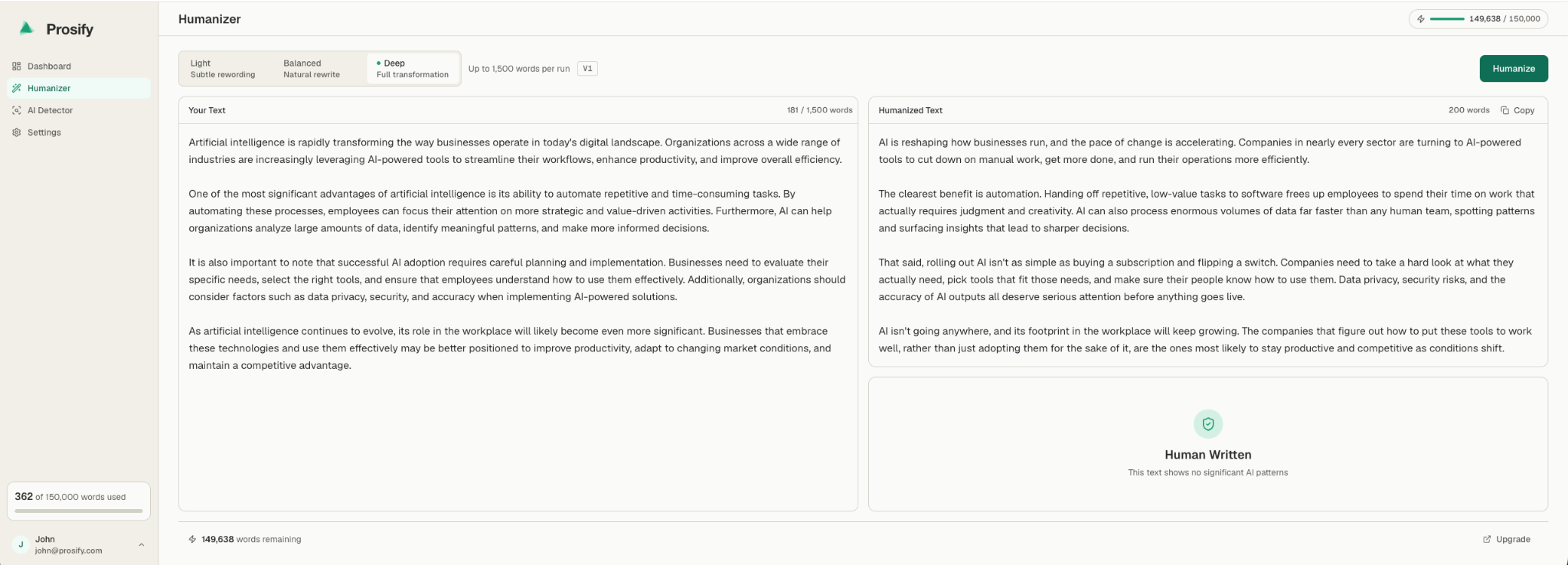
The same 181-word AI-generated passage rewritten using Prosify’s Deep mode.
With Deep mode, Prosify makes broader changes to sentence structure and phrasing.
For example, the original sentence:
“One of the most significant advantages of artificial intelligence is its ability to automate repetitive and time-consuming tasks.”
becomes:
“The clearest benefit is automation.”
Another generic passage:
“It is also important to note that successful AI adoption requires careful planning and implementation.”
becomes:
“That said, rolling out AI isn’t as simple as buying a subscription and flipping a switch.”
The underlying ideas remain the same, but the Deep version takes more freedom with how those ideas are expressed.
| Mode | How much it changes | Best for |
|---|---|---|
| Light | Small wording and phrasing changes | Drafts that already sound fairly natural |
| Balanced | Moderate restructuring and more natural phrasing | Most general-purpose writing |
| Deep | Larger sentence and structural changes | Generic or heavily AI-generated drafts |
Both the Balanced and Deep examples above were classified as “Human Written” by Prosify’s detector, which means no significant AI patterns were identified in these particular outputs. Results can vary depending on the text and detector, so this should be treated as an example rather than a guaranteed outcome.
You can learn more about the differences in our guide to Light, Balanced, and Deep humanizer modes.
Manual Editing vs. Prompt Engineering vs. an AI Humanizer
There are three common ways to make AI-generated writing sound more natural.
None is automatically best in every situation.
| Method | Time required | Control | Cost | Best for |
|---|---|---|---|---|
| Manual editing | High | Very high | Free | Important writing where voice and precision matter most |
| Prompt engineering | Medium | Medium | Usually included with the AI tool you use | Getting a better first draft before editing |
| AI humanizer | Low | Medium to high | Free or paid depending on usage | Quickly rewriting long or obviously AI-generated drafts |
Manual editing
Manual editing gives you the most control.
You can change exactly what you want, preserve important wording, and add details based on your own experience.
The disadvantage is time.
Reworking a 2,000-word draft sentence by sentence can easily take longer than generating the original draft.
Prompt engineering
Better prompts can reduce the amount of editing required later.
You can tell an AI model:
- Who the audience is
- What tone to use
- Which phrases to avoid
- How long paragraphs should be
- Whether to use examples
- Whether to take a stronger point of view
- Which vocabulary is appropriate
The result can be noticeably better.
But prompts cannot always eliminate the repetitive patterns that emerge across long AI-generated drafts.
AI humanizers
An AI humanizer sits between those two approaches.
Instead of manually rewriting every sentence, you provide the draft and let the tool restructure the wording and rhythm.
For example, Prosify’s AI Humanizer offers Light, Balanced, and Deep rewriting modes depending on how much you want the original text changed.
You still review the result, but you begin with a rewritten draft rather than the raw AI output.
The most practical approach
In many cases, the strongest workflow combines all three:
Better prompt → AI draft → AI humanizer → manual review
Prompt engineering improves the starting point.
The humanizer handles repetitive rewriting.
You handle facts, judgment, personality, and the final edit.
How to Humanize AI Text With Prosify
If you do not want to manually rewrite every paragraph, Prosify can handle much of the initial editing.
The process takes a few steps.
Step 1: Start with your draft
Take the AI-assisted text you want to improve.
Before humanizing it, read through the draft once.
Remove anything obviously incorrect, irrelevant, or repetitive. There is little value in polishing information you do not want to keep.
Step 2: Paste the text into Prosify
Open the Prosify AI Humanizer and paste your draft into the editor.
Prosify can rewrite text generated by any AI model, so the draft does not need to come from a particular tool.
For longer documents, working section by section can make the final review easier.
Step 3: Choose Light, Balanced, or Deep mode
Not every passage needs the same amount of rewriting.
Prosify gives you three modes:
Light makes smaller changes when the original draft is already close to what you want.
Balanced restructures more of the phrasing and sentence rhythm while keeping the original flow.
Deep makes the largest changes when the draft needs a more substantial rewrite.
If you are unsure which one to choose, our guide to Light, Balanced, and Deep humanizer modes explains what each mode changes and when it makes sense to use it.
Step 4: Humanize the text
Run the humanizer and review the rewritten version.
Prosify is designed to vary sentence length, replace stock AI phrases, simplify unnatural wording, and make the draft read less mechanically.
Do not treat the output as something you have to accept unchanged.
Read it.
Compare it with the original.
Then decide which version says what you want more clearly.
Step 5: Check important details
Pay particular attention to:
- Names
- Numbers
- Technical terminology
- Citations
- Quotes
- Product names
- Research claims
- Anything where exact wording matters
Automated rewriting should never replace factual review.
Step 6: Make the final version yours
The final pass is where you add the information a rewriting system cannot know automatically.
Change phrases you would never personally use.
Add an example from your work.
Strengthen an opinion.
Delete anything unnecessary.
Make sure the final text says what you intended to say.
Prosify can remove much of the repetitive editing work. The final judgment should remain yours.
How to Humanize ChatGPT Text
The same principles apply specifically to ChatGPT.
If you use ChatGPT for writing, one of the easiest mistakes is treating the first response as finished content.
Instead, treat it as raw material.
A better workflow looks like this:
- Ask ChatGPT for the first draft.
- Remove irrelevant sections.
- Fact-check important claims.
- Replace generic examples with specific ones.
- Humanize repetitive or robotic sections.
- Add your own perspective.
- Read the final draft aloud.
- Make one last edit before publishing.
You can also improve the original prompt.
Instead of:
Write a blog post about remote work.
Try:
Write for engineering managers at companies with 20 to 100 employees. Avoid generic introductions. Use short paragraphs. Focus on communication problems rather than productivity. Do not use phrases such as “rapidly evolving,” “delve,” or “it is important to note.” Make specific arguments instead of listing generic benefits.
Better inputs usually produce better drafts.
But even a strong prompt does not eliminate the need for editing.
If ChatGPT gives you a useful draft but it still sounds overly uniform, you can also paste it directly into Prosify’s AI Humanizer for a second rewriting pass.
Words and Phrases That Can Make AI Writing Sound Generic
No word automatically proves that text came from AI.
Still, certain expressions appear frequently in generic AI-generated writing and are often worth reviewing.
Examples include:
- Delve
- Realm
- Landscape
- Testament
- Underscores
- Pivotal
- Crucial
- Harness
- Leverage
- Robust
- Seamless
- Comprehensive
- Multifaceted
- Intricate
- Ever-evolving
- Rapidly evolving
- Game-changing
- Revolutionary
- Transformative
Also review phrases such as:
- It is important to note
- It is worth noting
- In today’s digital age
- In today’s fast-paced world
- In conclusion
- This highlights the importance of
- By understanding
- By leveraging
- A wide range of
- Plays a vital role
- At the forefront of
- Navigating the complexities of
Do not mechanically delete every one.
If “robust” is genuinely the right technical term, use it.
The problem is predictable repetition, not the existence of a particular word.
What Not to Do When Humanizing AI Text
Some editing techniques make writing different without making it better.
Do not replace every word with a synonym
This produces awkward sentences quickly.
For example:
AI helps businesses improve efficiency.
does not become more human as:
Artificial intelligence assists enterprises in augmenting operational efficacy.
That is arguably worse.
Humanization is not thesaurus mode.
Do not intentionally add grammar mistakes
Humans make mistakes.
That does not mean mistakes are what make writing human.
Deliberately adding typos, grammatical errors, or strange punctuation reduces quality and can make the text harder to read.
Natural writing can still be correct writing.
Do not make every sentence casual
A research paper should not suddenly sound like a group chat.
A business report should not be filled with slang just to create variation.
Humanization needs to preserve the appropriate tone.
Do not blindly trust an AI detector score
Detector results can vary depending on the detector, model, text length, domain, and style.
Research continues to show that AI detection is an imperfect classification problem rather than a definitive authorship test.
Optimize the writing for your reader first.
Do not skip fact-checking
Humanizing incorrect information produces natural-sounding incorrect information.
Verify:
- Statistics
- Dates
- Quotes
- Research claims
- Names
- URLs
- Pricing
- Product features
- Technical details
The more consequential the content, the more important this becomes.
Can Humanized AI Text Still Be Detected?
Yes.
Humanizing AI text does not guarantee that every AI detector will classify it as human-written.
Different detectors use different methods, and their results can disagree.
Some detection systems also attempt to identify AI-generated text after it has been paraphrased or rewritten.
At the same time, detectors themselves are imperfect.
This creates an important distinction:
Humanizing text and getting a particular detector score are not the same objective.
You can improve awkward AI writing dramatically and still receive an AI classification somewhere.
You can also encounter human-written text that receives an incorrect AI classification.
The most reliable reason to humanize text is therefore straightforward: make it better for the person reading it.
If you want to understand why the same paragraph can receive different scores from different tools, our guide to AI detectors explains how those systems evaluate text.
Is Using an AI Humanizer Cheating?
Not automatically.
It depends on the context and the rules governing the work.
A marketer rewriting an AI-generated product description has a very different situation from a student submitting an assignment that prohibits AI assistance.
Similarly, someone using an AI humanizer to improve the clarity of something they wrote themselves is not necessarily doing the same thing as someone generating an entire piece of work and presenting it as unaided original writing.
For academic work, follow the policy set by your school, instructor, or institution.
For professional work, consider your organization’s requirements, confidentiality rules, and disclosure policies.
The tool itself does not determine whether a use is appropriate.
The context does.
How to Make AI Writing Sound More Like You
If you regularly use AI for drafting, create a simple personal editing checklist.
Before publishing, ask:
- Would I actually say this?
- Is the introduction necessary?
- Are any sentences unnecessarily formal?
- Did I make a specific point?
- Are there examples?
- Did I repeat myself?
- Does every paragraph add something?
- Is anything factually questionable?
- Can I make this shorter?
- What can I add that only I would know?
That last question is particularly valuable.
The fastest way to make generic AI content less generic is to give it information that is genuinely yours.
A Simple AI Humanization Checklist
Before considering a draft finished, check the following:
- Remove generic introductions
- Delete repetitive conclusions
- Shorten unnecessarily long sentences
- Vary sentence length
- Replace vague claims with specific details
- Remove excessive transition words
- Simplify formal vocabulary
- Add concrete examples
- Include your actual opinion where appropriate
- Remove repeated ideas
- Check facts and numbers
- Preserve important terminology
- Match the tone to the audience
- Read the text aloud
- Make a final manual edit
You do not need to change every sentence.
Often, a relatively small number of targeted changes will transform the entire piece.
If going through that checklist line by line sounds tedious, Prosify can automate the initial rewrite. You can then spend your time on the parts a tool cannot supply for you: expertise, judgment, examples, and voice.
Frequently Asked Questions
What is the best way to humanize AI text?
The best approach is to combine structural editing with your own perspective.
Remove generic phrases, vary sentence length, simplify formal language, add specific examples, and include information or opinions that reflect the actual writer.
For longer drafts, an AI humanizer such as Prosify can speed up the initial rewriting process before you perform a final manual review.
Can I humanize AI text for free?
Yes.
You can humanize AI text manually without using any software by editing vocabulary, sentence structure, examples, tone, and paragraph flow.
You can also use a free AI humanizer. Prosify currently offers a free plan with no credit card required, so you can paste in a draft and try the humanization workflow before deciding whether you need a paid plan.
How do I make ChatGPT text sound more human?
Treat ChatGPT’s response as a draft rather than finished content.
Remove generic introductions, shorten repetitive explanations, use more natural vocabulary, add specific examples, introduce your own opinions, and change passages that do not sound like something you would actually write.
You can also run the draft through an AI humanizer before your final manual edit.
What words make AI text obvious?
There is no definitive list of words that proves that text is AI-generated.
However, generic AI drafts often overuse words and phrases such as “delve,” “landscape,” “crucial,” “robust,” “seamless,” “it is important to note,” and “in today’s rapidly evolving world.”
The larger problem is repeated patterns, not any individual word.
Does changing words make AI text human?
Usually not by itself.
Replacing words with synonyms changes vocabulary but leaves the underlying sentence structure, rhythm, ideas, and tone unchanged.
Effective humanization usually requires rewriting sentences and sometimes reorganizing entire paragraphs.
Can AI detectors tell if text has been humanized?
Sometimes.
Detection tools use different systems and can return different results for the same text. Some systems attempt to identify AI-generated text even after paraphrasing, while research has also documented reliability problems and false positives in AI-text detection.
There is no single AI detector result that can definitively establish how a piece of writing was produced.
Why does my own writing get flagged as AI?
AI detectors make probabilistic classifications rather than verifying authorship directly.
Certain writing styles may resemble patterns associated with AI-generated text. Formulaic, highly predictable, technical, or non-native English writing can sometimes produce false positives.
That is one reason detector scores should be interpreted as signals rather than proof.
Does humanizing AI text change its meaning?
It should not.
A good humanization process changes the presentation while preserving the underlying message.
However, automated rewrites can occasionally alter facts, terminology, or nuance, which is why you should always review the output before using it.
Is an AI humanizer the same as a paraphrasing tool?
Not exactly.
Traditional paraphrasing tools primarily rewrite sentences using alternative wording.
AI humanizers generally focus more broadly on sentence structure, rhythm, tone, predictability, and naturalness.
There is overlap between the two categories, but their intended outcomes are different.
Is prompt engineering better than an AI humanizer?
They solve different parts of the problem.
Prompt engineering helps you generate a better first draft. An AI humanizer works on text that has already been generated.
A strong workflow can use both: provide better instructions when generating the draft, humanize sections that still sound robotic, and perform a final manual review.
Should I humanize every piece of AI-generated text?
No.
Some AI outputs already work perfectly well for their intended purpose.
A short internal summary, structured data extraction, meeting notes, or a technical draft may not need stylistic rewriting.
Humanization matters most when people will actually read the finished text, and tone, clarity, credibility, or voice affect how the message is received.
Final Thoughts
AI makes producing a first draft easy.
Producing writing people actually want to read still requires judgment.
The biggest mistake is treating humanization as a search-and-replace exercise where “AI words” are swapped for “human words.”
Natural writing comes from a combination of rhythm, specificity, clarity, opinion, context, and restraint.
Start by removing the generic parts.
Make vague statements concrete.
Vary the rhythm.
Use simpler language when simpler language works.
Add examples.
Say what you actually think.
And when manually rewriting a long draft becomes tedious, Prosify’s AI Humanizer can handle the first pass for you. It rewrites AI-generated text with more natural phrasing and varied sentence structure while giving you control over how much the draft changes.
The final review is still yours.
AI can give you the draft. Prosify can help clean up the writing. Your ideas, judgment, and voice are what make the finished piece worth reading.